Shared WhatsApp Team Inbox for Sales & Customer Support Teams
Manage every customer WhatsApp conversation from one official business number. Assign chats to team members, access full customer history, send pre-saved quick replies, and collaborate without sharing phones.
Built for sales reps, support desks, and agencies that need accountability, role-based access, and instant CRM context inside every WhatsApp thread.
What is a Shared WhatsApp Team Inbox?
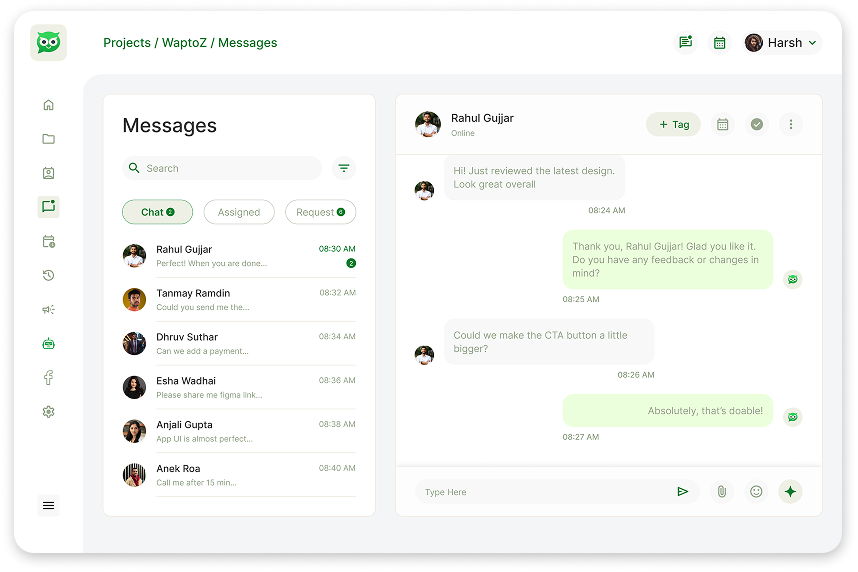
A Shared WhatsApp Team Inbox allows multiple sales or support agents to log into one centralized web dashboard and manage customer chats coming into a single official WhatsApp Business API number. In Waptoz, teams can assign owners to chats, review full conversation history, apply tags, share media or locations, and reply faster with saved templates.
End WhatsApp Account Sharing & Missed Customer Replies
Passing around one company phone or relying on WhatsApp Web across laptops breaks down as soon as your team grows.
Multiple Reps Messaging From Personal Numbers
When reps leave or work remotely, customer history walks out the door. Keep 100% of business conversations under your official company WhatsApp number.
Confusion Over Who Owns Which Customer
Without ownership assignment, two agents send conflicting answers—or nobody replies at all. Assign chats explicitly to specific team members inside Waptoz.
Slow Repetitive Typing in Live Support
Save approved templates, quick replies, documents, and preset locations so every team member answers consistently in seconds.


How Your Team Collaborates Inside Waptoz Inbox
Centralize one official WhatsApp number for your entire sales and support floor.
- •
Step 1: Centralize Your Official WhatsApp Business Number
Connect your WhatsApp Business Cloud API number to Waptoz so every incoming reply lands in one real-time shared inbox.
- •
Step 2: Add Team Members & Configure Role Permissions
Invite managers and agents with controlled CRM roles so team members only access the tools and conversations assigned to them.
- •
Step 3: Assign, Tag & Resolve Conversations Faster
Route chats to owners, share rich media or payment/demo links, log contact tags, and track full searchable chat history.
Shared Team Inbox Capabilities
Everything customer-facing teams need to reply fast with full context.
Real-Time Live Chat & Full Conversation History
Pick up any customer thread with zero blind spots.
- Real-time WebSocket message sync across team members
- Complete searchable chat history per contact
- Unified view alongside tags, attributes, and lead details
Chat Assignment & Role-Based Team Access
Keep accountability crystal clear across sales and support teams.
- Assign conversations to individual agents or managers
- Custom Role management inside CRM settings
- Block/unblock controls directly from conversation view
Pre-Saved Quick Replies & Rich Media Sharing
Eliminate repetitive typing during busy support hours.
- One-click Pre-saved Messages for common answers
- Send images, PDF brochures, videos, and preset locations
- Send Meta-approved 1:1 templates when 24h windows expire
Integrated With Leads, Quotations & Follow-Ups
Every support or sales conversation connects back to pipeline action.
- Update contact tags and custom attributes during live chats
- Connect threads to CRM follow-ups and scheduled demos
- Review AI-suggested tags or response drafts where enabled
Teams That Rely on Waptoz Shared Inbox
See how multi-agent visibility elevates customer experience.
Marketing Agencies →
Give campaign managers and account reps one structured workspace for replies.
Real Estate Brokerages →
Keep all broker-buyer chats on the agency's verified WhatsApp Business number.
E-commerce Support Desks →
Resolve order, delivery, and product questions rapidly with saved replies.
Event & Education Counselors →
Coordinate student and attendee inquiries across counseling staff cleanly.
Data Control & Meta Window Rules
- All messages remain inside your company's Waptoz CRM workspace — not scattered across personal phones.
- Free-form replies are allowed within 24 hours of a customer's last inbound message; older threads use Meta-approved templates.
- Protect customer data under Waptoz's Privacy Policy and India DPDP Act 2023 alignment.

WhatsApp Team Inbox FAQs
Multiple agents and managers can log into the Waptoz shared Team Inbox simultaneously to manage conversations on one official WhatsApp Business Cloud API number, governed by your selected plan tier and CRM roles.
Yes. Managers and agents can assign conversations to specific team members and manage lead ownership from one unified inbox.
Per Meta WhatsApp Business API rules, once 24 hours pass since the customer's last message, agents can re-engage that customer cleanly using a Meta-approved message template directly inside Waptoz.
Yes. Agents can send media files (images, documents, videos), current or preset locations, pre-saved quick replies, and approved templates from the chat composer.
What Our Users Say
We are trusted by businesses that value speed, simplicity and smart automation.
Put Your Entire Team on One Official WhatsApp Inbox
Start free or book a live demo to see chat assignment, saved replies, and role permissions in action.